Apache Kafka: Publish Event
- Former user (Deleted)
- Stonebranch (Deactivated)
Disclaimer
Your use of this download is governed by Stonebranch’s Terms of Use, which are available at Stonebranch Integration Hub - Terms of Use.
Overview
Apache Kafka is an open-source distributed event streaming platform used by thousands of companies for high-performance data pipelines, streaming analytics, data integration, and mission-critical applications. This Universal Extension is responsible for publishing events (messages) to topics in Kafka.
Version Information
| Template Name | Extension Name | Extension Version |
|---|---|---|
| Apache Kafka: Publish event | ue-kafka-producer | 1.2.0 |
| Apache Kafka: Publish event | ue-kafka-producer | 1.1.2 |
| Apache Kafka: Publish event | ue-kafka-producer | 1.1.1 |
| Apache Kafka: Publish event | ue-kafka-producer | 1.1.0 |
| Apache Kafka: Publish event | ue-kafka-producer | 1.0.0 |
Refer to Changelog for version history information.
Software Requirements
This integration requires a Universal Agent and a Python runtime to execute the Universal Task.
Software Requirements for Universal Template and Universal Task
Requires Python of version 3.7. Tested with the Universal Agent bundled Python distribution (python version 3.7.6)
Software Requirements for Universal Agent
Both Windows and Linux agents are supported:
Universal Agent for Windows x64 Version 7.1.0.0 and later.
Universal Agent for Linux Version 7.1.0.0 and later.
Software Requirements for Universal Controller
Universal Controller Version 7.1.0.0 and later.
Software Requirements in Cases of SSL Certificate Verification
If Python 3.7 Distribution for Universal Agent is installed, the path location of the Certificate Authority file must be provided.
If Python is installed on the local system but not with the Universal Agent Distribution:
If the SSL certificate is signed by a publicly trusted certificate authority (CA), it is not required to provide the certificate.
If the SSL certificate is self-signed, either the path location of the certificate file must be provided, or the certificate must be stored at the machine's default location for installed certificates (in this case it will be trusted for all applications).
Supported Apache Kafka versions
This Integration is tested on Kafka version 3.0. Integration is expected to work with versions 2.0.0 onwards, however, this has not been tested.
Key Features
This Universal Extension supports the following main features.
- Actions
- Send a message to Kafka with the capability to select
,the topic, the partition, the message key, the message value, and message metadata
- Send a message to Kafka with the capability to select
- Authentication
- PLAINTEXT
- SASL_SSL SCRAM
- SSL with capability for SSL Client Authentication
- Other
- Capability to fetch topics and partitions dynamically from Kafka during task creation
- Capability to automatically select the serialization method depending on the key/value message data types.
- Capability to control the transport of the messages by configuring the message acknowledgment strategy and the request timeout.
Import the Universal Template
To use the Universal Template, you first must perform the following steps.
This Universal Task requires the Resolvable Credentials feature. Check that the Resolvable Credentials Permitted system property has been set to true.
To import the Universal Template into your Controller, follow these instructions.
When the files have been imported successfully, refresh the Universal Templates list; the Universal Template will appear on the list.
Modifications of this integration, applied by users or customers, before or after import, might affect the supportability of this integration. For more information refer to Integration Modifications.
Configure Universal Task
For the new Universal Task type, create a new task, and enter the task-specific details that were created in the Universal Template.
Input Fields
The input fields for this Universal Extension are described below.
Field | Input type | Default value | Type | Description |
|---|---|---|---|---|
Action | Required | Send a message | Choice | The action performed upon the task execution. |
| Bootstrap Servers | Required | - | Text | 'host:port' string (or list of 'host:port' strings, separated by a comma) that the producer should contact to bootstrap initial cluster metadata. This does not have to be the full node list. It just needs to have at least one broker that will respond to a Metadata API Request (more than one can be used, though, in case a server is down). Example with two servers: 'host1:port1,host2:port2'. |
Security Protocol | Required | PLAINTEXT | Choice | The Security protocol used to communicate with Kafka brokers. Valid values are:
|
SASL Mechanism | Optional | SCRAM–SHA–256 | Choice | The Authentication mechanism when Security Protocol is configured for SASL_SSL. Valid values are:
Required when Security Protocol is "SASL_SSL". |
SASL User Credentials | Optional | - | Credentials | Credentials for SCRAM authentication. They are comprised of:
Required when Security Protocol is "SASL_SSL". |
SSL Hostname Check | Optional | true | Boolean | Flag to configure whether SSL handshake should verify that the certificate matches the broker's hostname. Required when Security Protocol is "SASL_SSL" or "SSL". |
CA Bundle Path | Optional | - | Text | Path and file name of the Certificate Authority (CA) file to use in certificate verification. Used when it is required to locate the CA file if Security Protocol is configured for "SASL_SSL" or "SSL". |
| Client Certificate Path | Optional | - | Text | Filepath of the Client's Certificate for Client authentication over SSL in PEM format. Required when Security Protocol is "SSL". |
| Client Private Key Path | Optional | - | Text | Filepath of the Client's private key for Client authentication over SSL in PEM format. The private key can be either unencrypted or encrypted. In the case of an encrypted private key, the respective Client Private Key Password should be provided. Required when Security Protocol is "SSL". |
| Client Private Key Password | Optional | - | Credential | In case the client's private key in Client Private Key Path is encrypted, the key required for decryption. The Credentials definition should be as follows.
|
Topic | Required | - | Dynamic Choice | Dynamic fetched list of topics to subscribe the consumer to. The user can select the required topic from a drop-down list. |
Partition | Optional | - | Choice | The partition to which the message will be assigned to. The user can select the required partition from a drop-down list. A topic should be selected from the respective drop-down list. If no partition key is specified when producing a record, Kafka will assign messages with the same key to the same partition. When no key is specified, the message is delivered to a random partition. |
Client Id | Optional | - | Text | This string is passed in each request to servers and can be used to identify specific server-side log entries that correspond to this client. The constructed client id seen on the server side is Client Id + "task instance id". If Client Id is not populated, the default value used is "ue-kafka-monitor-#". Example: "ue-kafka-monitor-#1635348654595881042JAYE7BKNPYVG3" |
Message Payload | Required | - | Large Text | YAML type that the Message Payload is comprised of:
|
Show Advanced Settings | Required | False | Boolean | By checking this field, three more fields are available for advanced configuration:
|
Acks | Required | Leader | Choice | The number of acknowledgments the producer requires the leader to have received before considering a request complete. This controls the durability of records that are sent. The following options are available:
|
Headers | Optional | - | Array | A list of header key/value pairs, in case more metadata about the Kafka message have to be added. |
Request Timeout (ms) | Optional | 30000 | Integer | The configuration controls the maximum amount of time the client will wait for the response of a request. |
Task Examples
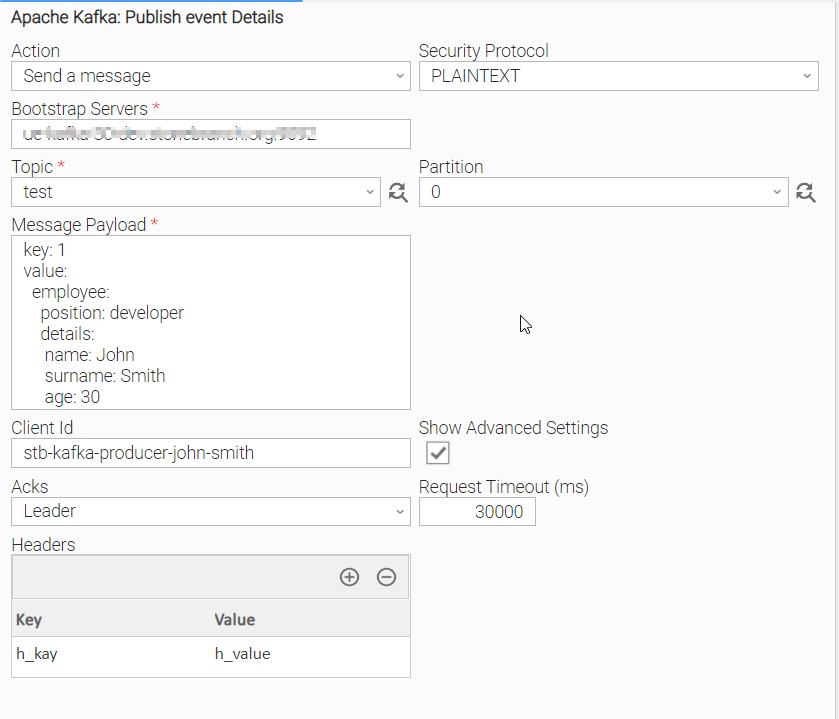
Send Kafka Message with Plaintext authentication
Plaintext authentication is performed by choosing Security Protocol = PLAINTEXT and populating the needed fields.
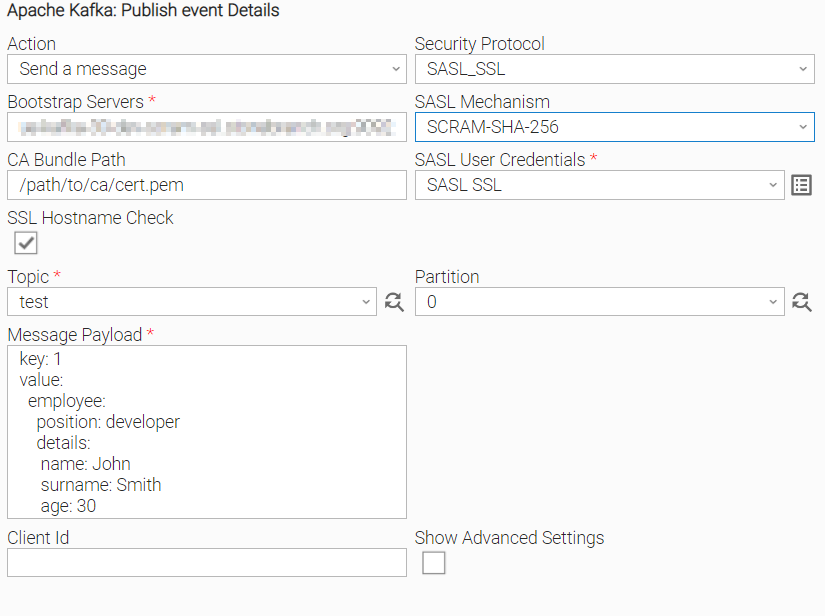
Send Kafka Message with SASL_SSL authentication
SASL_SSL authentication is performed by choosing Security Protocol = SASL_SSL and populating the related CA bundle file path and credential field.
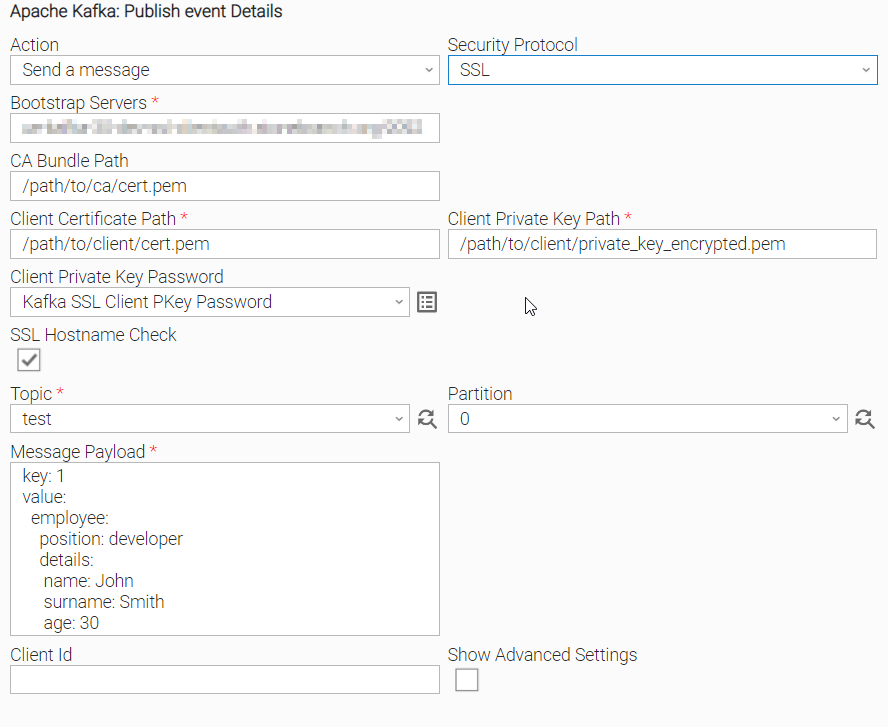
Send Kafka Message with client authentication over SSL
Client authentication is performed by choosing Security Protocol = SSL and populating the related certificate and key file path fields.
In case the Client Private Key certificate is encrypted, the respective password for decryption of the key, is needed.
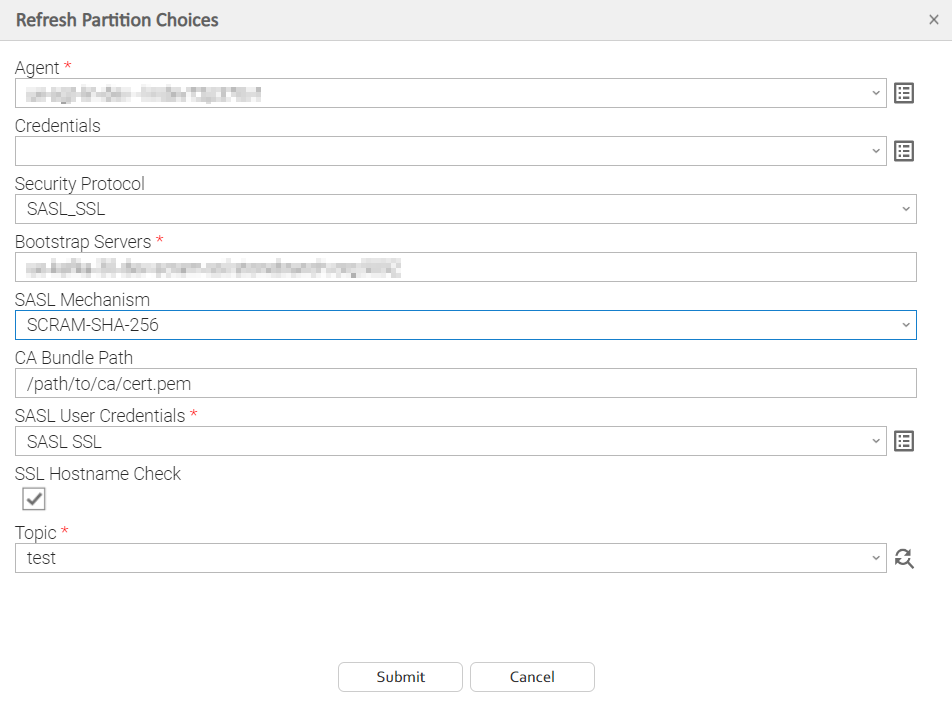
Dynamic Choices
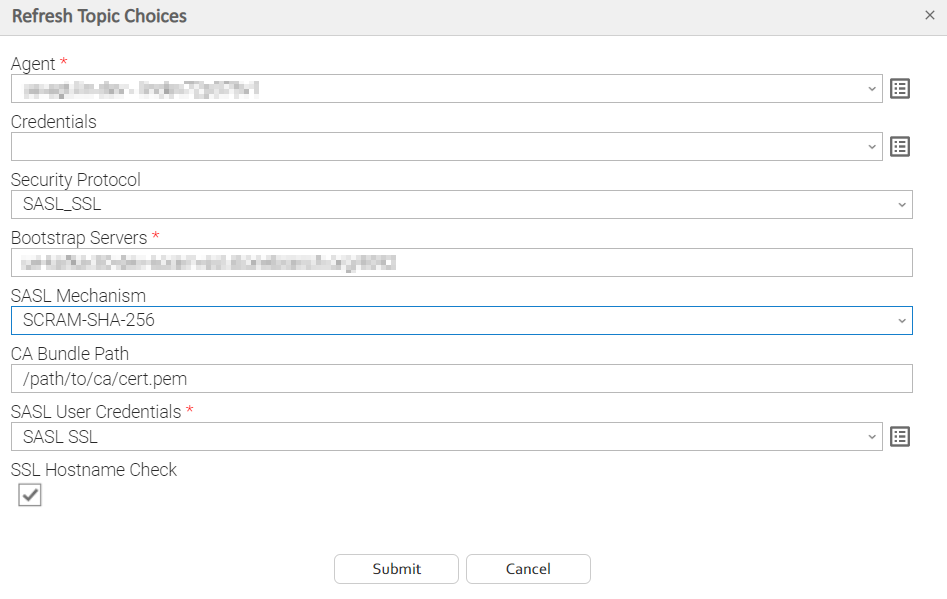
Topic
To retrieve the list of available topics of the provided bootstrap servers, the basic authentication fields are required.
Partition
To retrieve the list of available partitions of the provided bootstrap servers, both the basic authentication fields are required and an existing topic.
Message Payloads
According to the key and value datatypes of the YAML message, the extension will handle their respective serialization before sending them to Kafka.
Examples of message payloads with different datatypes for key/value and how they are serialized, are followed.
Message without Value

Integer as a Key and an Integer as a Value
Both key and value will be serialized as integers:

YAML:
key: 1
value: 256
String as a Key and an Integer as a Value
Key will be serialized as a string (an integer in single or double quotes will be interpreted as string) and value will be serialized as an integer:

YAML:
key: "1"
value: 256
Integer as a Key and a Parameter as a Value
The value will be serialized according to the variable datatype:

YAML:
key: "1"
value: 256
Integer as a Key and an Object as a Value
The value which in this case is an object will be serialized as a JSON string:
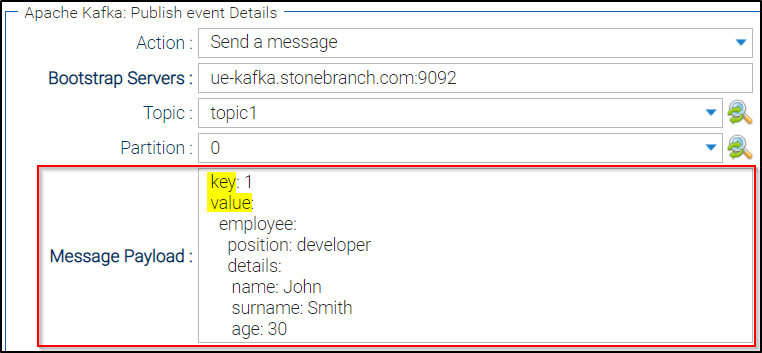
YAML:
key: 1
value:
  employee:
    position: developer
    details:
     name: John
     surname: Smith
     age: 30
Task Output
Exit Codes
The exit codes for this Universal Extension are described below.
Exit Code | Status Classification Code | Status Classification Description | Status Description |
|---|---|---|---|
0 | SUCCESS | Successful Execution | SUCCESS: Task executed successfully. |
1 | FAIL | Failed Execution | Unexpected Exception: < exception message > |
2 | AUTHENTICATION_ERROR | Bad Authentication data | AUTHENTICATION_ERROR: Incorrect username or password. |
10 | CONNECTION_ERROR | Bad connection data | CONNECTION_ERROR: No brokers available for the specified Bootstrap Server or Credentials. Execute in Debug mode for more details. |
11 | CONNECTION_TIMEOUT | Connection timed out | CONNECTION_TIMEOUT: Kafka Timeout Error. Connection timed out while pending for response from Kafka. |
20 | DATA_VALIDATION_ERROR | Bad input fields validation | DATA_VALIDATION_ERROR: Some of the input fields cannot be validated. See STDOUT for more details. |
21 | MESSAGE_ACKS_ERROR | Acknowledgment error | MESSAGE_ACKS_ERROR: Not enough replicas acknowledged the message. |
Extension Output
In the context of a workflow, subsequent tasks can rely on the information provided by this integration as Extension Output.
The Extension Output contains Attribute result. The result Attribute, as displayed below, is based on the Kafka response of the related message as it is produced based on action "Send Message".
The Extension Output for this Universal Extension is in JSON format as described below.
{
    "exit_code": 0,
    "status_description": "SUCCESS: Task executed successfully.",
    "status": "SUCCESS",
    "invocation": {
        "extension": "ue-kafka-producer",
        "version": "1.2.0",
        "fields": {
            "action": "Send a message",
            "security_protocol": "SSL",
            "ssl_check_hostname": true,
            "sasl_mechanism": "SCRAM-SHA-256",
            "ssl_cafile": "/path/to/ca/cert.pem",
            "sasl_username": null,
            "sasl_password": null,
            "client_certificate_path": "/path/to/client/cert.pem",
            "client_private_key_path": "/path/to/client_private_key.pem",
            "client_private_key_password": "****",
            "bootstrap_servers": "kafka.bootstrap.com:9092",
            "topic": "test",
            "partition": null,
            "message_payload": {
                "key": 1,
                "value": "test"
            },
            "client_id": "ue-kafka-producer-#1682197200191106591I0HGMM9JD6IUW",
            "request_timeout_ms": 30000,
            "acks": "Leader",
            "headers": []
        }
    },
    "result": {
        "topic": "test",
        "partition": 0,
        "offset": 221,
        "timestamp": "1682328194041"
    }
}
STDOUT and STDERR
STDOUT and STDERR provide additional information to User. The populated content can be changed in future versions of this extension without notice. Backward compatibility is not guaranteed.
Integration Modifications
Modifications applied by users or customers, before or after import, might affect the supportability of this integration. The following modifications are discouraged to retain the support level as applied for this integration.
- Python code modifications should not be done.
- Template Modifications
- General Section
- "Name", "Extension", "Variable Prefix", "Icon" should not be changed.
- Universal Template Details Section
- "Template Type", "Agent Type", "Send Extension Variables", "Always Cancel on Force Finish" should not be changed.
- Result Processing Defaults Section
- Success and Failure Exit codes should not be changed.
- Success and Failure Output processing should not be changed.
- Fields Restriction Section
The setup of the template does not impose any restrictions, However with respect to "Exit Code Processing Fields" section.- Success/Failure exit codes need to be respected.
- In principle, as STDERR and STDOUT outputs can change in follow-up releases of this integration, they should not be considered as a reliable source for determining success or failure of a task.
- General Section
Users and customers are encouraged to report defects, or feature requests at Stonebranch Support Desk.
Document References
This document references the following documents:
Name | Description |
|---|---|
User documentation for creating Universal Templates in the Universal Controller user interface. | |
User documentation for creating Universal Tasks in the Universal Controller user interface. |
Change Log
ue-kafka-producer-1.2.0 (2023-04-28)
Enhancements
Added: Support for SSL Security Protocol and Client authentication over SSL.Added: Extension Output result upon successful task instance execution.
Fixes
Fixed: Improve robustness of application (#32501)Fixed: Debug mode execution enhancement (#32733)Fixed: Data validation error due to missing partition-dependent fields (#32500)
ue-kafka-producer-1.1.2 (2022-03-30)
Fixes
Fixed: Change of Template Icon
ue-kafka-producer-1.1.1 (2021-12-09)
Fixes
Fixed: Minor bugfixes
ue-kafka-producer-1.1.0 (2021-10-26)
Enhancements
Added: Authentication enhancements (SASL SCAM over SSL)
ue-kafka-producer-1.0.0 (2021-09-27)
Added: Initial Release and Support for PLAINTEXT